Picture a Greenpoint loft, 11:47 PM. A producer I know realizes the only copy of an interview shot earlier that day is on a pocket SSD that's been sitting in the back seat of an Uber for the last four minutes. He's not sure which Uber. He's calling the driver. The driver isn't picking up. The footage isn't backed up yet because "I'll do it when I get home" was the plan.
The driver eventually answered. The drive came back. But the 47 minutes in between is what changed how I think about a video footage backup workflow. The expensive stuff in the bag was never the problem. The dangerous stuff weighs nothing.
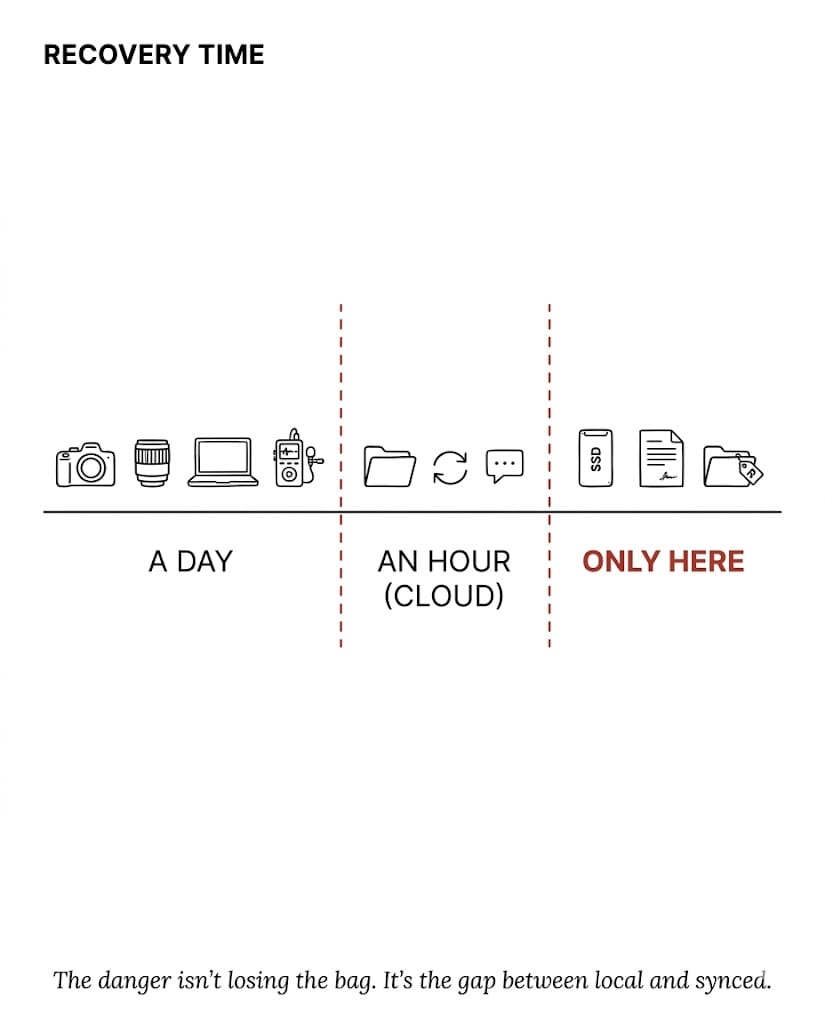
Table of Contents
How Working Creatives Sort Gear by Recovery Time
When you start out, you sort your bag by what costs the most. The camera body. The cinema lens. The laptop. You guard the expensive stuff obsessively. A few years in, you sort it differently — by recovery time. Some things replace in a day. Some replace in an hour. Some never replace at all. Once you see the bag through that lens, the priorities flip.
Zone 1 — Replaceable from a store
Camera bodies, lenses, audio kit, the laptop itself. If a piece of it walks off, that's a stressful afternoon and an annoying B&H run, but it's a transaction. The whole list is replaceable inside a week, often inside a day in NYC if you're willing to pay retail. A lost camera is a credit card swipe with a bruise. It's not catastrophic. It just feels catastrophic because the dollar number is loud.
Zone 2 — Replaceable from the cloud
Project files, drafts in progress, email, calendar, contracts I've already signed digitally. None of it lives on the laptop in any meaningful sense. The laptop is a keyboard I happen to bring. Anything synced to Google, Dropbox, Frame.io, GitHub, or 1Password comes back the moment I sign in on a new machine. According to Backblaze's 3-2-1 backup principle — three copies, two media, one offsite — Zone 2 is the offsite layer doing its job in the background. An hour of setup time is the worst case.
Zone 3: The Stuff That Actually Disappears
Zone 3 is the thin slice between local and synced. It's where you actually lose things, and almost nothing on the planet replaces what's in it.
For a video shoot, Zone 3 looks like this: today's footage on the SSD, before the night sync. The interviews you've already trimmed in the local Premiere project but haven't pushed to the team drive. The signed paper release the speaker handed you in the green room. The deposit check the planner gave you in cash. The model release the kid's mom signed at the brand activation, the one you stuffed in your jacket pocket before lighting the next setup.
I had a close call on a panel shoot last winter. Five speakers, all signed paper releases on a clipboard. We wrapped, the venue staff started flipping tables for the next event, and the clipboard — with all five releases — ended up in a banquet linen cart heading to a laundry truck in the basement. We caught it with about four minutes to spare. If we hadn't, the only path forward would have been emailing five busy executives the next morning asking them to re-sign forms they'd already signed once. That's a phone call you do not want to make. The footage was great. None of it would have been usable.
The danger was never the expensive stuff getting lost. It's the gap between local and synced — and that gap is almost always smaller than you think it is, until the one day it isn't.
Six Backup Habits I Run on Every Shoot
These aren't aspirational. They're the rules that survive a long day when you're tired and just want to go home.
- Photograph every signed paper contract before leaving the room. Phone camera, Notes app, sent to email. Two seconds of work. After that, no physical object alone can ruin your week.
- Push local work to cloud before you sleep, not before you leave. "I'll back it up tomorrow" is the sentence that precedes every story I've ever heard about lost footage.
- Treat SSD-to-cloud sync as the last shot of the day. Not post-shoot cleanup. Not Monday. Build it into the shoot itself — the day isn't over until the footage exists in two places.
- Carry a second physical drive on high-stakes shoots. Two SSDs, mirrored at the end of each card pull. Total cost: about $200. Total reduction in catastrophic risk: most of it.
- Email yourself the critical paperwork as an automatic third backup. Cloud account locked? You still have the email. It costs nothing and saves the project the one time you'll need it.
- Audit your "local-only" surface area once a quarter. Open every project folder on your machine. Anything not synced somewhere — sync it now. The danger zone gets bigger when you stop looking at it.
What to Ask a Video Vendor About Data Discipline
If you're hiring a video team for something that matters — a fundraising gala, a product launch, a CEO interview — ask one question early in the conversation: "What's your backup workflow on shoot day?" The answer separates the pros from the hobbyists. A working studio will tell you about dual card slots, on-set offload, paired SSDs, end-of-day cloud sync, and how they handle paper releases. A hobbyist will tell you they've "never lost anything." That's not a workflow. That's a coin flip with good luck so far.
At Core Visuals, we treat data discipline as part of the work, not a step after the work — same as lighting, same as audio, same as showing up on time. It's not a brag. It's the baseline you should expect from anyone shooting your event or corporate content. The CISA guidance on data backup says basically the same thing every working pro learns the hard way: redundancy isn't optional, and it isn't something you do later.
The bag is mostly recoverable. The expensive stuff is a credit card. The software stuff is a sign-in. The only thing that can actually disappear is the thin layer of work-in-progress riding around with you between locations and sync points. Shrink that layer until there's almost nothing in it. That's the whole discipline.
Hiring a video team? Ask about backup.
If you want a vendor who treats your footage like it's irreplaceable — because it is — let's talk about your project.
Start a ConversationIf this resonated, the short version of this idea lives on my LinkedIn — that's where most of these notes show up first, ahead of the long-form posts here.